
The Best Pipeline Stages for Home Service Businesses (And Why Yours Is Leaking Money)
If leads are falling through the cracks, it is not because you are lazy. It is because you are running without a clear pipeline.
When leads live in your head, on sticky notes, or scattered across texts and emails, jobs slip. Not because you do not care -- because there is no system telling you what needs to happen next and when.
A CRM pipeline for contractors fixes this. It is a visual board that shows every lead and job moving through your business -- from the first call to the review request -- so nothing gets forgotten and nothing falls through.
The contractors who consistently book more jobs are not working harder. They have a better system.
This post gives you the exact pipeline stages that work for home service businesses, where most pipelines leak money, and how to trigger automation at each stage so the system runs itself.
What a Pipeline Actually Is (And Why It Makes You More Money)
A pipeline is a visual workflow. Every lead and job lives in a stage that tells you exactly what needs to happen next.
Think of it as a job board that updates automatically, sends messages for you, and alerts your team when something needs attention. These are your service business pipeline stages -- from the first call to the final review request.
Here is what a pipeline prevents:
Forgetting to follow up on an estimate you sent three days ago
A booked job falling through because nobody sent a reminder
A completed job that never got a review request
An old lead who said not yet getting lost forever instead of nurtured
The hidden benefit: your brain gets lighter
When everything is in a pipeline you are not carrying all of it in your head. You look at the board, see what is in each stage, and know exactly what needs to happen today. Less scrambling. Less guessing. Fewer of those moments where you realize three days later that a lead went cold because nobody followed up.
The 5 Places Most Home Service Pipelines Leak Money
Before you build the right stages it helps to know where the common leaks are. These are the five spots where contractors consistently lose jobs without realizing it.
Leak 1 -- New leads do not get an immediate response
A lead sits in New for two hours while you are on a job. By the time someone calls back the homeowner has already booked a competitor. Speed to lead is the biggest single factor in converting new inquiries. Your lead pipeline for plumbers needs an instant response trigger from the very first stage.
Leak 2 -- Estimates go out and nobody follows up
The estimate lands in Estimate Pending and sits there for a week. No check-in, no reminder, no next step. The homeowner forgets about you. You lose a job you already did the work to earn.
Leak 3 -- Booked jobs do not get confirmations or reminders
No confirmation text means no-shows. No reminder means the homeowner forgets the appointment time. Both waste your crew's day and cost you real money.
Leak 4 -- Completed jobs do not get review requests
The job is done but nobody asks for a review. Your Google rating stays flat while competitors with the same skill level outrank you because they built a system that asks automatically.
Leak 5 -- Old leads never get reactivated
Not ready yet leads get dropped into a mental pile and forgotten. Six months later that homeowner decides to move forward and calls your competitor because you never stayed in touch.
The Best Pipeline Stages for Contractors
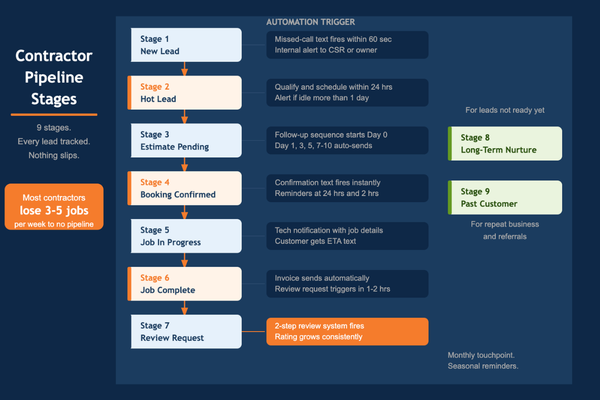
Here are the stages that work. Keep them simple -- the more stages you have the less likely your team is to actually use them. Every stage needs one clear definition and one clear next action.
Stage 1 -- New Lead
Goal: Respond and qualify within 5 minutes
Next action: Trigger missed-call text-back if by phone. Internal alert fires immediately.
Stage 2 -- Hot Lead -- In Conversation
Goal: Schedule the estimate or send a booking link
Next action: Do not let this stage sit idle for more than 24 hours. Move fast.
Stage 3 -- Estimate Pending
Goal: Deliver estimate and trigger follow-up sequence
Next action: Day 0 confirmation, Day 1 check-in, Day 3 helpful text, Day 5 hold a spot, Day 7 easy decision prompt -- all automatic.
Stage 4 -- Booking Confirmed
Goal: Send confirmations and reminders
Next action: Confirmation fires immediately. Reminder 24 hours before. Reminder 2 hours before. Nothing manual.
Stage 5 -- Job In Progress
Goal: Tech dispatched -- communicate status
Next action: Tech notification with job details. Customer gets ETA text when tech is en route.
Stage 6 -- Job Complete
Goal: Trigger review request and referral ask
Next action: Review request fires automatically within 1 to 2 hours of job completion.
Stage 7 -- Short-Term Follow-Up
Goal: Keep warm leads engaged without being annoying
Next action: Check in every 3 to 5 days. Alert fires if idle for more than a week.
Stage 8 -- Long-Term Nurture
Goal: Monthly touchpoint for leads not ready yet
Next action: Timing issue, budget, spouse decision. Monthly message. Seasonal reminders. Door stays open.
Stage 9 -- Past Customer -- Repeat Nurture
Goal: Maintenance reminders and repeat business
Next action: Seasonal reminder. Annual check-in. Referral ask. Your easiest source of new revenue.
What Triggers Each Stage Move
The pipeline only works if leads actually move through it. Here is what triggers each transition. Automate as many of these as possible -- if it requires someone to remember, it will eventually get missed.
New Lead to Hot Lead
Call answered or text replied to
Hot Lead to Estimate Pending
Estimate requested or sent
Estimate Pending to Booking Confirmed
Booking link used, deposit paid, or job scheduled
Booking Confirmed to In Progress
Dispatch trigger fires 30 min before scheduled time
In Progress to Job Complete
Tech marks job done or invoice paid
Job Complete to Review Request
Fires automatically within 1 to 2 hours
Any stage idle 3 days
Internal alert fires -- someone takes action
The rule: every stage should have one next best action
If a lead sits in Estimate Pending for five days with no movement you should know about it automatically -- not discover it a week later by accident. Build idle alerts into every stage. That one habit alone will recover one to two jobs per week.
The CRM workflow for contractors that works is simple: stage moves trigger automations, automations trigger follow-up, idle alerts catch anything that slips. Set it up once and it runs itself.
One Pipeline or Two -- Sales vs Jobs
Option A -- One pipeline (best for solo to 3-tech operations)
Everything in one view. Simple to manage. Works perfectly until you have enough volume that the ops side starts cluttering the sales side. Start here.
Option B -- Two pipelines (best for 4-plus tech operations)
Split it when one board feels cluttered:
Sales pipeline: New Lead through Booking Confirmed -- focused on converting leads to booked jobs
Jobs pipeline: Dispatched through Job Complete -- focused on running the job and triggering the review
The split gives your sales and ops teams separate clean views. Nothing overlaps. Nothing gets lost in a board trying to do too much at once. There is no wrong answer -- the right answer is whichever one your team actually uses consistently.
Pro Tips to Make Your Pipeline Stick With a Real Team
A pipeline only works if people use it. Here is how to make adoption stick:
Define each stage in one sentence. Estimate Pending means the estimate is out and we are waiting on a decision. No ambiguity.
Assign an owner to each stage move. Who is responsible for moving the card from Estimate Pending to Booking Confirmed? Name them.
Use tags for lead source. Google, website, referral, yard sign -- knowing where leads come from tells you where to invest.
Track won and lost reasons. When a lead goes cold note why. After 30 days you will see patterns you can fix in your pricing or process.
Do a 10-minute CRM pipeline review every week. Look at what is sitting idle. Send one text or make one call to each stuck lead. This one habit recovers one to two jobs per week.
A CRM pipeline for contractors is not a tech project. It is a discipline. The stages are simple -- the consistency is what makes it work.
Quick Checklist: Does Your CRM Pipeline Help You Close More Jobs?
New leads get an automatic response within 5 minutes
Estimate follow-up sequence triggers automatically from Estimate Pending
Booking confirmation and reminders fire automatically
Job completion triggers review request within 2 hours
Old leads in Long-Term Nurture get a monthly touchpoint
Each stage has a clear one-sentence definition
Each stage has a clear next action
Idle leads trigger an internal alert after 3 days
Won and lost reasons are being tracked
Weekly 10-minute pipeline review is on the calendar
If you said no to more than three of those, your pipeline is costing you jobs every week.
The Bottom Line
A pipeline is not a fancy tech feature. It is a simple answer to one question: where is every lead right now and what needs to happen next?
When you can answer that question at a glance you stop losing jobs to forgetfulness and slow follow-up. You start running your business like an operator -- not just a tradesperson.
Set up the stages. Connect the automations. Do the weekly review. The leads that were slipping through will start showing up as booked jobs instead.
Want the exact pipeline stages installed in your CRM?
Book a Free Growth Audit at ProContractor.app
We will set up your pipeline with stage definitions, automation triggers, and idle alerts -- built for your business, not a generic template.
Frequently Asked Questions
What are the best pipeline stages for a plumbing or HVAC business?
New Lead, Hot Lead, Estimate Pending, Booking Confirmed, Job In Progress, Job Complete, Short-Term Follow-Up, Long-Term Nurture, and Past Customer. Nine stages covers everything from the first call to repeat business without getting too complicated to use.
How many pipeline stages should a contractor have?
Between 7 and 10 is the sweet spot. Fewer than 7 and you lose visibility into where things are stalling. More than 10 and your team stops using it because it is too complicated. Keep every stage defined in one sentence and actionable.
Should I use one pipeline or separate sales and jobs pipelines?
Start with one. Split into two when your volume makes one board feel cluttered -- usually around 4 to 5 techs. The sales pipeline handles New Lead through Booking Confirmed. The jobs pipeline handles dispatch through completion and review request.
What stage should trigger estimate follow-up?
Estimate Pending. The moment a lead moves into that stage an automated follow-up sequence should kick off -- Day 0 confirmation, Day 1 check-in, Day 3 helpful text, Day 5 hold a spot, Day 7 easy decision prompt.
How do I keep leads from slipping through the cracks?
Two things: automation and idle alerts. Automation handles the follow-up so you do not have to remember. Idle alerts tell you when a lead has been sitting in a stage too long without movement. Those two systems together eliminate almost all of the slip-through that costs contractors jobs every week.
This post was brought to you by ProContractor.app -- growth systems built for contractors, by people who understand the trades.